FMS500
ONE


GENERAL SPECIFICATIONS

Inputs

1x digital (ON/OFF mode)

Outputs

1x digital, (-)

Power supply

8 – 31V; Protection from impulses up to 150V;

Consumption at 12V: active: <50mA, sleep: <8 mA;

Registration of power cut-off to device event log;

Internal battery 210/700 mAh (optional)

Internal memory

8 МB, up to 150.000 entries

Accelerometer

3 axis digital accelerometer

Internal odometer

+

Operational temperature range

from -40 to 185 °F

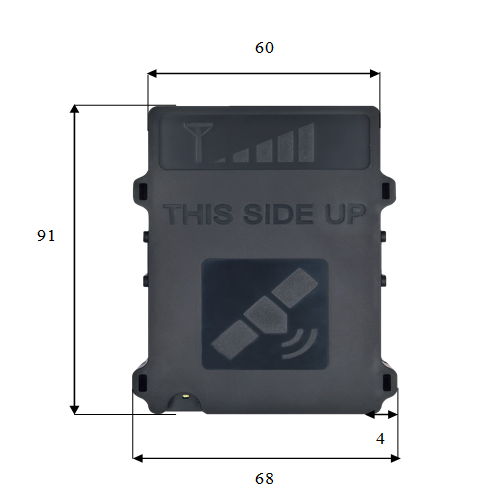
Dimensions

68x91x19 mm

Weight

Tracker – 2.19 oz, set – 4.97 oz

GSM

Internal antenna

GSM/GPRS class

10 (up to 85,6 kbit), class B

Detection of GSM jamming

+

GNSS

Internal antenna

Sensitivity

-162 dBm

Acquisition

Cold <30 s, hot 1 s. A-GPS support

1.

Device and GPS status LED

2.

SIM card

3.

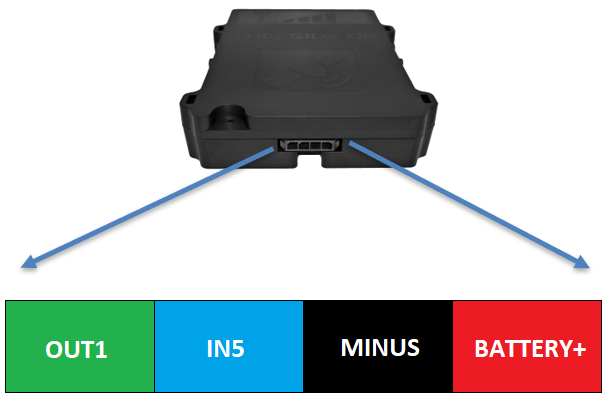
Socket 1x4 pins

4.

USB interface


PINOUT OF THE UNIT

  • 1.7A

    OUT1 ( - )

  • 10V

    Power supply, min start up voltage

  • 8V

    Power supply, min operating voltage after start up

  • 30V

    Power supply, stage1

  • 31V

    Clamping voltage

  • varistor

    Clamping type

  • 4.7V

    IN5

  • +/-3%

    Voltage threshold


DEVICE INSTALLATION

Central unit is only mounted inside of the vehicle, it cannot be installed in the engine chamber, next to the cabin, or in the area of exposure to direct external conditions. Central unit must be hidden (for example, under the upholstery), as well as protected from moisture exposure. Device must be fastened in a stable position to avoid random twitches and displacements (suspension on cables is strictly prohibited). Central unit must be mounted horizontally. Precise orientation is of particular importance to flawless operation of the system, since the device is equipped with acceleration sensors recording the data which directly affects the results obtained. 

POWER SUPPLY

Power supply of central unit has to be connected directly from the vehicle’s battery, using 1A fuse.

Minus (ground) wire

Ground wire should be connected to the vehicle body. A reliable electrical contact with the body must be ensured, wire has to be bolted.

Ignition input (combustion lock status)

Connect a wire of the vehicle where voltage is present only when ignition is activated to IN5.


DEVICE DIAGNOSTIC

Long blinks countDescriptionActions to be taken
1 long blink
Device is online

Ready to go!

2 long blinks
Device can’t connect to server

Try to reboot device or force to connect to server.

3 long blinks
Device cant connect to internet
  1. Check the APN, maybe device is trying to connect to internet with wrong APN (most common issue);
  2. Check the SIM card itself. Maybe it does not have internet access.
4 long blinks
No GPRS registration

Check the SIM card.

Most probably network provider did not enable GPRS service.

5 long blinks
No GSM registration

Check the SIM card.

  1. Most probably network provider did not enable GSM service;
  2. Maybe SIM card is 3G or 4G.
6 long blinks
Device can’t read SIM card

Check the SIM card.

  1. Maybe pin code added;
  2. Maybe issues with SIM holder;
  3. Maybe the SIM card chip is damaged.
7 long blinks
Modem does not turn ON
  1. Check power supply connection (not enough current);
  2. Modem issue (very rare).

Quality products and reliable service let the company present in more than 50 international markets. Company is actively investing into new products and development of distributor network.

Sales

Tel: +1 312 859 6001
Email: This email address is being protected from spambots. You need JavaScript enabled to view it.

Technical Support

Tel: +1 312 859 6001
Email: This email address is being protected from spambots. You need JavaScript enabled to view it.